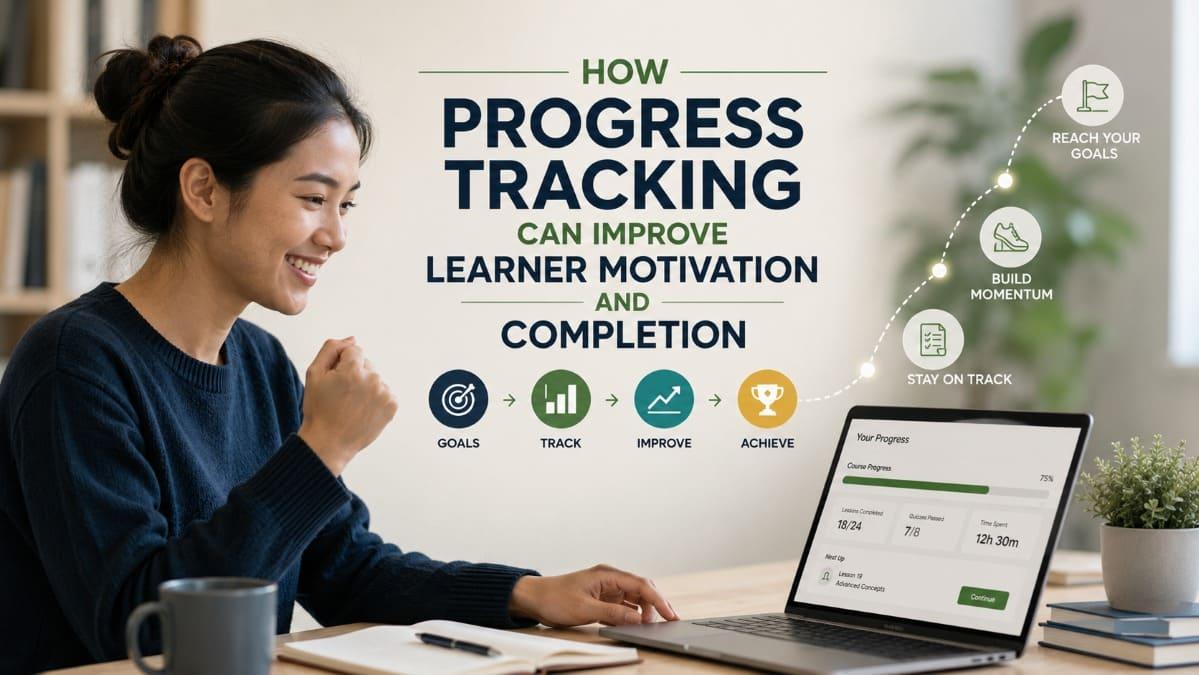
Progress tracking makes the learning journey visible. It
helps learners understand what they have completed, what remains, whether they
are meeting expectations, and what action they should take next. For
institutions and training providers, the same system provides operational
signals that can reveal where learners slow down, disengage, struggle with
assessments, or require additional support.
However, tracking only improves motivation and completion
when the information is meaningful. A decorative progress bar, activity
counter, or leaderboard cannot replace clear learning goals, relevant feedback,
practical milestones, and timely intervention. This article explains how
organizations can design progress tracking that supports self-regulated
learning, creates credible small wins, and enables program teams to improve
learner retention without turning learning into constant surveillance.
- Quick
Answer
- What
Is Learner Progress Tracking?
- Why
Visible Progress Can Strengthen Learner Motivation
- How
Progress Tracking Supports Course Completion
- What
Institutions and Training Providers Should Track
- How
to Design Progress Indicators Learners Can Actually Use
- Turning
Progress Data Into Timely Learner Support
- Common
Progress-Tracking Mistakes
- A
Practical Implementation Framework
- FAQ
- Conclusion
Quick Answer
Progress tracking can improve learner motivation and
completion by showing learners where they are, what they have accomplished,
what still needs attention, and which step should come next. This visibility
reduces uncertainty and helps a long course feel more manageable.
Useful progress tracking may include completed lessons,
learning-path milestones, quiz performance, practical assignments, reflection
activities, attendance, and evidence of skill application. The strongest
systems do not simply count activity. They connect progress information with
meaningful goals, relevant feedback, and a clear next action.
For institutions and training providers, progress data can
also reveal operational problems. Teams can identify learners who never
started, stopped after the first module, repeatedly struggled with an
assessment, or became inactive shortly before completion. This allows support
to be targeted rather than sent indiscriminately to an entire cohort.
Progress tracking does not guarantee motivation or course
completion. Poorly designed indicators may create pressure, reward superficial
clicking, or make struggling learners feel further behind. The objective is not
to display more data. It is to give learners and program teams enough useful
information to make better decisions throughout the learning journey.

What Is Learner Progress Tracking?
Learner progress tracking is a system for recording and
communicating how a learner is moving through a learning journey so that both
the learner and the program team can determine what should happen next.
The system may use several types of evidence:
- lessons
or modules completed;
- learning-path
milestones reached;
- quiz
and assessment results;
- assignments
or practical tasks submitted;
- instructor
feedback received;
- attendance
or participation;
- reflection
and self-assessment;
- time
since the learner’s last meaningful activity;
- demonstrated
competencies or portfolio evidence.
This is broader than showing that a course is “60%
complete.” A percentage usually represents content completion, but
content completion is only one dimension of progress.
A learner may have watched eight out of ten videos while
misunderstanding an essential concept. Another learner may have completed only
half of the digital modules but already applied the skill successfully in their
workplace. Both learners are progressing, but the meaning of their progress is
different.
For that reason, institutions should distinguish among three
related concepts:
|
Progress Dimension |
What It Shows |
Example |
|
Activity progress |
Whether the learner has accessed or completed required
activities |
Seven of ten lessons opened |
|
Learning progress |
Whether understanding or capability appears to be
developing |
Quiz accuracy improves after practice |
|
Outcome progress |
Whether learning is being applied toward the program’s
intended result |
Learner submits a correct workplace procedure |
|
Program progress |
Whether the learner is moving through the required
learning pathway |
Foundation stage completed; practice stage begins next |
A reliable progress system makes these distinctions clear.
It does not present every platform interaction as evidence of learning.
Completion tracking tells an organization whether learners
moved through the course. Learning progress tracking helps explain whether that
movement was meaningful.
Progress information should also serve different audiences.
Learners need simple, actionable information. They usually
need to know what has been completed, what remains, whether they are meeting
the expected standard, and how to continue.
Instructors need diagnostic information. They need to see
where understanding breaks down, which learners require feedback, and which
parts of the course may need clarification.
Program managers need aggregated operational information.
They need to understand participation, completion, assessment performance,
cohort differences, intervention workload, and recurring drop-off points.
Senior decision-makers may need a smaller set of indicators
connected to program goals, such as enrollment-to-completion movement,
assessment achievement, participation consistency, or evidence of workplace
application.
Trying to show every audience the same dashboard usually
creates unnecessary complexity.
Why Visible Progress Can Strengthen Learner Motivation
Visible progress can strengthen motivation because it gives
learners evidence that their effort is producing movement. It turns an abstract
commitment—“complete this course”—into a series of smaller, observable steps.
This matters particularly in self-paced and mobile learning.
Without a trainer present in every session, learners must repeatedly decide
whether to begin, continue, pause, or return. When the learning journey is
unclear, even motivated participants may underestimate what they have
accomplished or overestimate how difficult it will be to finish.
Progress reduces uncertainty
A learner who cannot see the structure of a course may not
know whether the next lesson takes five minutes or fifty minutes. They may not
understand whether an assessment is optional, whether previous work has been
saved, or how many stages remain before completion.
Clear progress information reduces this ambiguity.
A useful learner-facing screen might communicate:
- current
stage;
- completed
milestones;
- the
next required action;
- estimated
effort for the next step;
- assessment
or assignment status;
- conditions
for completing the learning path.
Reducing uncertainty does not make the course easier. It
makes the required effort more predictable.
Milestones create credible small wins
A long program can feel distant from completion,
particularly when participants are balancing learning with employment, family
responsibilities, fieldwork, or community commitments.
Meaningful milestones give learners intermediate evidence of
advancement. Examples include:
- completing
the orientation stage;
- passing
a foundation quiz;
- submitting
the first practical exercise;
- completing
the first week of a structured pathway;
- receiving
feedback on an assignment;
- demonstrating
one component of a larger competency.
The milestone must represent genuine movement. Awarding a
badge for opening the platform may create activity, but it says little about
learning. Recognizing the completion of a relevant practice activity is more
credible.
This principle connects naturally with how
satisfaction can be created through progress, application, feedback, and
recognition rather than certificates alone.
Tracking supports self-regulated learning
Self-regulated learning involves processes such as goal
setting, planning, monitoring, reflection, strategy adjustment, and
help-seeking. A progress system can support these processes by helping learners
compare their current position with an expected goal.
A 2023 meta-analysis covering 32 intervention studies and
3,492 participants found that tools designed to encourage monitoring had a
moderate effect on academic achievement and smaller effects on self-regulated
learning and motivation. Effects varied according to the design and
implementation of the monitoring tool. The analysis also indicated stronger
results when tools addressed both learning content and learning behavior,
encouraged metacognitive monitoring, and were combined with feedback and opportunities
to revise work. Review the
meta-analysis of learner monitoring tools.
The practical implication is important: monitoring is not
automatically motivating. It becomes more useful when learners can interpret
the information and act on it.
A percentage without guidance may tell a learner that
something is incomplete. It does not explain why progress has stalled or how to
recover.
Progress becomes motivational when it shows learners not only how far they have come, but how they can keep moving.

How Progress Tracking Supports Course Completion
Progress tracking supports completion through two connected
mechanisms.
First, it helps learners manage their own journey. Second,
it helps the organization identify and respond to problems before disengagement
becomes permanent.
Neither mechanism works well in isolation.
It makes the remaining journey manageable
A broad instruction such as “complete the leadership course”
may feel difficult to act on. A more specific instruction such as “complete the
eight-minute delegation lesson and submit one workplace example” is easier to
begin.
Progress tracking helps translate the full program into
visible next actions.
This is particularly useful when the learning pathway
contains different activity types, such as:
- orientation;
- foundational
content;
- short
assessment;
- guided
practice;
- workplace
application;
- mentor
feedback;
- final
reflection;
- completion
recognition.
When these stages are visible, learners can understand that
completion is a sequence rather than one large task.
It helps learners resume after an interruption
Many learners do not abandon a course through a single
deliberate decision. They miss one session, lose track of where they stopped,
become uncertain about what to do next, and gradually stop returning.
A good progress system makes re-entry easier.
When learners return, the platform should be able to answer:
- Where
did I stop?
- What
did I already complete?
- Is
my previous work still available?
- What
is the smallest reasonable action I can take now?
- Do
I need to review anything before continuing?
A clear “continue learning” action is usually more helpful
than returning learners to a crowded course homepage.
It reveals early signs of disengagement
For a training provider, low completion often becomes
visible only at the end of a program. By that time, many learners may have been
inactive for weeks.
Progress data can surface earlier signals, including:
- enrollment
without starting;
- completion
of onboarding but no first lesson;
- repeated
exits from the same module;
- several
unsuccessful assessment attempts;
- long
delays between related lessons;
- unfinished
assignments;
- inactivity
after receiving feedback;
- learners
who are close to completion but have stopped.
These indicators do not prove why a learner disengaged. A
participant may have workload pressure, limited connectivity, unclear
instructions, accessibility barriers, low perceived relevance, or a personal
constraint the platform cannot observe.
Progress signals should therefore initiate diagnosis, not
assumptions.
The broader causes and interventions are discussed in why
learners drop out of online courses and how training providers can reduce it.
It enables differentiated support
Not every inactive learner needs the same message.
Consider four learners:
- Learner
A enrolled but never started. They may need orientation, access
support, or a clearer explanation of the program’s value.
- Learner
B completed three modules and stopped at an assessment. They may need
clarification, additional practice, or instructor feedback.
- Learner
C completed most activities but has been inactive for ten days. They
may need a concise reminder showing how close they are to finishing.
- Learner
D completed the course but performed poorly on essential assessments.
They may need remediation rather than another completion reminder.
A generic “continue your course” message ignores these
differences.
The real operational value of progress tracking is not the
dashboard itself. It is the organization’s ability to respond differently to
different learner situations.
FitAcademy
Understand the Learning Journey Behind Completion
FitAcademy helps institutions and training providers organize mobile-first learning paths with progress tracking, assessments, structured modules, and clearer visibility into learner participation.
Learn More About FitAcademyWhat Institutions and Training Providers Should Track
Institutions do not need to track every available
interaction. They need a focused set of indicators connected to the learning
design and the decisions the team can realistically make.
A useful principle is:
Do not collect a progress metric unless someone
understands what it means and can decide how to respond.
Learner entry indicators
Entry indicators help teams understand whether participants
successfully begin the program.
Relevant signals may include:
- invitation
delivered;
- account
activated;
- onboarding
completed;
- first
lesson started;
- first
learning activity completed;
- technical
assistance requested.
A large gap between enrollment and first activity may
indicate weak onboarding, confusing access instructions, low urgency, or a
mismatch between registration and genuine learner commitment.
It is not necessarily a content problem because many
learners have not encountered the content yet.
Participation and continuity indicators
These indicators show whether learners are maintaining
movement.
Examples include:
- modules
completed;
- milestone
completion;
- learning
sessions over time;
- last
meaningful activity;
- time
between required stages;
- assignments
submitted;
- live
sessions attended;
- practice
activities completed.
“Meaningful activity” should be defined carefully. Logging
in, opening a notification, or loading a page may not represent genuine
learning participation.
Understanding and performance indicators
Performance indicators help distinguish content movement
from learning development.
Depending on the program, these may include:
- quiz
results;
- assessment
attempts;
- improvement
across attempts;
- assignment
quality;
- rubric
criteria achieved;
- instructor
feedback status;
- practical
demonstrations;
- self-assessment
compared with instructor assessment.
A single quiz score should not carry more meaning than its
design supports. A short recall quiz may confirm recognition of key terms but
cannot necessarily demonstrate workplace competence.
Support and friction indicators
These signals help program teams understand where learners
require assistance.
Examples include:
- repeated
assessment failure;
- unanswered
learner questions;
- unresolved
technical issues;
- feedback
waiting time;
- repeated
visits to instructions;
- unusually
long pauses at one stage;
- accessibility
or device-related problems;
- support
requests by course section.
When many learners experience the same problem, the issue
may be in the course or platform rather than in the learners.
Completion and post-completion indicators
Completion data should include more than a final percentage.
Institutions may need to understand:
- how
many learners met all completion requirements;
- how
long completion typically took;
- which
requirements caused the most delay;
- whether
assessment standards were achieved;
- whether
certificates or recognition were issued;
- whether
learners continued to another pathway;
- whether
participants applied the learning;
- whether
follow-up support was needed.
Completion should be defined before the program launches.
Otherwise, teams may discover too late that watching content, submitting
assignments, passing assessments, and receiving a certificate have been treated
as interchangeable events.
|
Indicator |
Question It Helps Answer |
Possible Action |
|
Enrollment without activation |
Are learners able and willing to enter the program? |
Improve invitations, onboarding, or access support |
|
Early module drop-off |
Does the opening create enough clarity and relevance? |
Review orientation, lesson sequence, and first-task
difficulty |
|
Repeated assessment attempts |
Are learners misunderstanding a concept or the assessment
itself? |
Add explanation, practice, or instructor feedback |
|
Long inactivity gap |
Has the learner lost momentum? |
Send a contextual reminder or support offer |
|
Stopping near completion |
Is one final requirement creating avoidable friction? |
Clarify requirements and provide a direct continuation
path |
|
High completion with weak scores |
Are learners progressing without sufficient understanding? |
Strengthen assessments, practice, and remediation |
|
Low completion across one cohort |
Is there a scheduling, facilitation, or access problem? |
Investigate cohort conditions before changing all content |

How to Design Progress Indicators Learners Can Actually Use
Learner-facing progress information should be simpler than
an administrator dashboard. Its purpose is to support orientation and action,
not expose the entire analytics system.
Show progress in meaningful units
A percentage is only useful when learners understand what it
represents.
“50% complete” may mean:
- half
the videos were opened;
- half
the required lessons were completed;
- half
the total course time has passed;
- half
the competencies were demonstrated;
- half
the pathway stages were approved.
These interpretations are not equivalent.
Where possible, show the underlying unit:
- 6
of 10 lessons completed;
- 2
of 4 pathway stages completed;
- foundation
assessment passed;
- practical
assignment awaiting feedback;
- one
remaining requirement before completion.
The clearer the denominator, the more credible the indicator
becomes.
Always connect status with a next action
A progress display should not stop at “incomplete.”
It should direct the learner toward a reasonable action:
- continue
the next lesson;
- retry
the assessment after review;
- submit
the remaining task;
- read
instructor feedback;
- attend
the next live session;
- contact
support;
- return
to a prerequisite module.
A visible next step reduces the need for learners to
interpret course structure independently.
Separate completed, current, and upcoming work
Learners should be able to distinguish:
- what
is finished;
- what
is currently available;
- what
is required next;
- what
is locked or dependent on another activity;
- what
is optional.
When everything appears as one long content list, the
learner must repeatedly reconstruct the pathway.
A structured learning path is especially valuable in
mobile-first programs because learners have less screen space for orientation.
Short lessons still need a clear relationship with the wider course.
This is one reason microlearning
and longer e-learning formats should be evaluated by structure and learning
purpose, not duration alone.
Use milestones without trivializing the learning
Milestones can reinforce momentum, but the recognition
should match the achievement.
A useful milestone may acknowledge:
- completion
of a learning stage;
- improvement
after practice;
- successful
application of a skill;
- consistent
participation over an appropriate period;
- contribution
to peer learning;
- completion
of a difficult assignment.
Too many low-value rewards can weaken the meaning of
recognition. They may also encourage learners to optimize for points rather
than understanding.
Make progress recoverable
A learner who falls behind should be shown a route back into
the program.
Avoid progress designs that communicate failure without
support, such as:
- permanent
red warning states;
- public
low rankings;
- lost
streaks with no recovery;
- unexplained
locked modules;
- repeated
failure messages without guidance.
A recovery-oriented system might instead say:
- review
this short explanation before retrying;
- continue
from your last completed step;
- choose
a new target date;
- request
trainer assistance;
- complete
one prerequisite activity;
- resume
with a shorter practice task.
Progress tracking should support persistence, not merely
record absence.
Keep attention focused on learning
Progress elements should guide learners without competing
with the lesson itself. Excessive animations, points, pop-ups, countdowns, and
reward messages may create visual or psychological noise.
The same principle applies to lesson design more broadly: learner
attention should be captured through relevance and clarity rather than
distracting stimulation.

Turning Progress Data Into Timely Learner Support
Progress data has limited value when it remains inside a
dashboard. Institutions need a practical process for reviewing signals,
deciding which situations require intervention, and assigning responsibility
for follow-up.
A 2025 meta-analysis of learning progress monitoring
examined 25 studies containing 87 effect sizes and 7,379 learners. It found a
small positive effect on academic performance. Results were stronger when
teachers received ongoing consultation and data-specific support for adjusting
instruction. The research focused mainly on school-based reading, writing, and
mathematics, so it should not be treated as direct evidence that a digital
progress bar will increase online course completion. Its more transferable
lesson is that data becomes more useful when educators are supported in acting
on it. Read
the 2025 learning progress monitoring meta-analysis summary.
Define intervention triggers
Program teams should identify situations that require
attention before the course begins.
For example:
- learner
has not activated an account after three days;
- onboarding
is complete, but the first lesson has not started;
- no
meaningful activity has occurred within an expected learning window;
- assessment
has been attempted unsuccessfully several times;
- assignment
feedback has not been opened;
- the
learner is one requirement away from completion;
- multiple
learners are stopping at the same activity.
The timing should reflect the program. Three days may be
significant in an intensive two-week course but irrelevant in a self-paced
six-month program.
Match the response to the likely barrier
An intervention should be based on the available evidence.
|
Progress Signal |
Possible Barrier |
More Appropriate Response |
|
Registered but never started |
Access confusion or weak onboarding |
Send direct access instructions and explain the first step |
|
Stopped during the first module |
Low relevance, excessive difficulty, or unclear
expectations |
Clarify the value and review the opening experience |
|
Repeated quiz failure |
Conceptual misunderstanding or weak assessment design |
Provide targeted explanation, practice, or trainer support |
|
Inactive after good early progress |
Scheduling pressure or lost momentum |
Show completed progress and offer one manageable next
action |
|
Assignment submitted but no continuation |
Delayed feedback or unclear next stage |
Provide feedback status and explain what happens next |
|
Nearly complete but inactive |
Final-stage friction |
State the exact remaining requirement |
|
Whole cohort slows at one point |
Content, facilitation, or technical problem |
Investigate the shared experience before messaging
individuals |
Combine automation with human judgment
Automation can help institutions scale routine
communication. It may be appropriate for:
- access
reminders;
- milestone
confirmation;
- unfinished
activity reminders;
- notifications
that feedback is available;
- encouragement
near completion;
- scheduled
learning-path updates.
Human intervention becomes more important when:
- the
learner repeatedly struggles;
- the
issue involves personal context;
- assessment
performance is unexpectedly low;
- instructions
may be unclear;
- the
learner requests help;
- the
program involves high-stakes or complex capability development.
A scalable support system does not automate every
interaction. It reserves human attention for situations where interpretation,
empathy, or instructional judgment is needed.
Review patterns at course level
The purpose of progress data is not only to correct learner
behavior. It should also help the institution improve its own program.
If a substantial portion of a cohort stops at the same
point, teams should examine:
- lesson
length and complexity;
- prerequisite
knowledge;
- instructions;
- assessment
alignment;
- device
compatibility;
- loading
performance;
- instructor
response time;
- scheduling;
- perceived
relevance;
- accessibility.
Repeated drop-off is often a design signal.
When many learners stop in the same place, the question is not only “Why did they leave?” It is also “What did the program ask them to overcome?”
Common Progress-Tracking Mistakes
Treating the progress bar as the strategy
A progress bar is an interface element, not a retention
system.
This mistake happens because progress visualization is easy
to see and relatively easy to implement. Organizations may assume that once
learners can see a percentage, motivation will improve automatically.
The operational consequence is that the organization
continues to lack meaningful information about understanding, obstacles, and
support needs.
A better approach is to connect visible progression with
assessments, milestones, feedback, and next-step guidance.
Counting clicks as learning
Platforms produce large volumes of activity data. This can
encourage teams to treat logins, page views, video starts, and button clicks as
evidence of engagement.
These signals may be useful diagnostically, but they are
weak indicators of learning when used alone.
The business risk is misleading reporting. A program may
appear highly active while learners retain little, avoid difficult activities,
or complete content without applying it.
Activity data should be interpreted alongside assessment,
assignment, feedback, and outcome evidence.
Showing learners too many metrics
An administrator may benefit from cohort completion,
assessment distribution, inactivity patterns, and support volume. A learner may
only need three things: current status, completed milestones, and the next
action.
Exposing too much data can increase cognitive load and make
the platform feel administrative.
The better approach is role-based visibility. Each audience
should see information relevant to its decisions.
Using public rankings as the main motivator
Leaderboards can motivate some participants, particularly
those already performing well. They may discourage others, expose differences
caused by time availability or prior experience, and shift attention toward
competition.
Ranking may be suitable for certain voluntary challenges or
community activities. It should not be treated as a universal retention
mechanism.
Private personal improvement, milestone recognition, and
cohort collaboration may be more appropriate in many institutional programs.
Intervening without context
Sending the same message to every inactive learner is
operationally convenient but often ineffective.
A reminder that says “You are falling behind” may be
inappropriate for someone waiting for instructor feedback or experiencing a
technical problem.
Progress-based communication should explain the relevant
status, provide a specific next action, and make support accessible.
Equating completion with competence
Completion is important for understanding participation and
program operations. It does not automatically prove mastery, behavior change,
or workplace performance.
When institutions report completion as the only success
metric, teams may optimize courses for easy finishing rather than meaningful
learning.
The solution is not to ignore completion. It is to interpret
it alongside evidence appropriate to the program’s objectives.
The most dangerous progress metric is not an inaccurate
number. It is an accurate number that the organization interprets as evidence
of something it never measured.
A Practical Implementation Framework
Institutions and training providers can implement progress
tracking through the following sequence.
1. Define what successful progression means
Start with the program’s intended outcome.
Determine whether progress depends on:
- accessing
required content;
- completing
a sequence;
- passing
assessments;
- submitting
practical work;
- attending
live activities;
- receiving
mentor approval;
- demonstrating
a competency;
- completing
a final reflection.
Do not let the platform’s default completion settings define
the educational model.
2. Map the learner journey
Document the stages from invitation through post-completion
activity.
A simple pathway may include:
- registration
and activation;
- onboarding;
- first
learning activity;
- foundation
milestone;
- practice;
- feedback;
- application;
- final
assessment;
- completion
recognition;
- continued
learning.
This map identifies where progress should be visible and
where learners may need support.
3. Select a small set of meaningful signals
Choose indicators connected to decisions the team can make.
A starting set may include:
- activation;
- first-module
completion;
- milestone
status;
- assessment
performance;
- last
meaningful activity;
- assignment
status;
- completion
eligibility.
Additional metrics can be introduced after the basic
workflow is functioning.
4. Design the learner-facing experience
For each stage, determine what the learner should see:
- current
position;
- completed
work;
- next
required action;
- expected
effort;
- feedback
status;
- available
support;
- completion
conditions.
Test the experience on the devices learners actually use,
particularly when the program is mobile-first.
5. Establish intervention rules and ownership
Decide:
- which
signals trigger a response;
- how
quickly the response should happen;
- whether
it is automated or human;
- who
owns the intervention;
- how
the outcome will be recorded;
- when
escalation is required.
Without ownership, dashboards may identify problems that no
one addresses.
6. Pilot with one course or cohort
A pilot allows the organization to test whether:
- progress
definitions are understood;
- notifications
are useful;
- inactivity
thresholds are realistic;
- instructors
can interpret the data;
- support
workload remains manageable;
- learners
find the system helpful rather than intrusive.
Collect qualitative feedback alongside platform data.
7. Improve the learning journey, not only the dashboard
After the pilot, identify whether the most valuable changes
involve:
- clearer
instructions;
- shorter
or better-sequenced lessons;
- improved
assessments;
- quicker
feedback;
- stronger
onboarding;
- fewer
required steps;
- better
mobile access;
- more
relevant examples;
- additional
learner support.
The goal is not to perfect the visualization while leaving
the underlying learning experience unchanged.

FAQ
What is the main purpose of learner progress tracking?
The main purpose is to help learners and program teams
understand movement through the learning journey. For learners, tracking should
clarify what is complete, what remains, and what to do next. For institutions,
it should reveal participation patterns, learning difficulties, and situations
that may require support. Reporting is useful, but tracking creates more value
when it leads to timely decisions.
Does a progress bar increase course completion?
A progress bar may support completion by making the
remaining journey visible, but it cannot compensate for irrelevant content,
weak onboarding, confusing requirements, difficult navigation, or inadequate
support. Its meaning must also be clear. Learners should know whether the
percentage represents lessons, required activities, assessments, or overall
pathway milestones.
Which progress metrics are most useful for training providers?
Useful starting metrics include account activation,
first-lesson completion, milestone status, assessment performance, last
meaningful activity, assignment status, and completion eligibility. The right
combination depends on the program’s learning objectives. Training providers
should prioritize indicators that lead to a defined response rather than
collecting every interaction available from the platform.
How often should learner progress be reviewed?
Review frequency should match the program’s pace and risk.
An intensive short course may require daily monitoring, while a flexible
long-term program may be reviewed weekly. Immediate alerts may be justified for
unresolved technical access or high-stakes assessment issues. The organization
should avoid sending reminders more frequently than learners can realistically
act on them.
Can progress tracking become intrusive?
Yes. Tracking may feel intrusive when learners do not
understand what is collected, data is used for excessive surveillance, rankings
expose individual performance, or communications create unnecessary pressure.
Institutions should collect proportionate information, communicate its purpose,
protect learner privacy, limit access by role, and use the data to improve
learning and support rather than merely enforce activity.
Should completion rate be the main program KPI?
Completion rate is an important operational indicator, but
it should rarely stand alone. It shows whether participants reached the defined
endpoint, not necessarily whether they understood, retained, or applied the
learning. Depending on the program, completion should be interpreted alongside
assessment results, practical evidence, learner feedback, participation
consistency, and post-training outcomes.
Conclusion
Progress tracking can improve learner motivation and
completion when it turns an unclear learning journey into visible, manageable
movement. Learners gain a clearer sense of what they have accomplished, what
remains, and how to continue. Institutions gain earlier visibility into
disengagement, assessment difficulty, delayed feedback, and recurring friction
across a cohort.
The strategic value does not come from displaying more
numbers. It comes from connecting meaningful progress signals with clear
learning goals, relevant feedback, accessible support, and timely action.
Institutions should therefore avoid treating progress
tracking as a decorative platform feature or a reporting requirement added
after course design. Progress needs to be defined as part of the learning
architecture itself: what counts as advancement, which evidence matters, how
learners interpret their status, and how the program responds when movement
stops.
A strong system makes progress visible without reducing
learning to clicks. It helps learners continue while giving training teams the
operational insight needed to improve the journey.
FitAcademy
Make Learner Progress Easier to See and Support
FitAcademy provides institutions and training providers with a structured mobile-first environment for organizing learning paths, tracking progress, managing assessments, and delivering clearer branded learning experiences.
Learn More