Internal links help education websites turn separate
articles, course pages, and platform pages into a connected learning journey.
For education businesses, training providers, edtech marketers, SEO teams, and
content strategists, internal linking is not only a technical SEO task. It
shapes how learners move from awareness content to deeper guides, course pages,
and branded learning experiences. This article explains how to structure
internal links inside education content clusters, including pillar articles,
supporting articles, course pages, related resources, breadcrumbs, and
conversion pages. It also shows how a better link structure can support search
visibility, learner understanding, topical authority, and platform growth
without making the website feel over-optimized.
- Quick
Answer
- What
Internal Linking Means for Education Content Clusters
- Why
Education Websites Need Guided Content Pathways
- Start
With a Clear Cluster Map Before Adding Links
- How
to Link Pillar Articles, Supporting Articles, and Course Pages
- Anchor
Text Should Explain the Learning Path
- Course
Pages Need Internal Links in Both Directions
- How
Internal Links Support White-Label Learning Platform Growth
- Common
Internal Linking Mistakes Education Teams Should Avoid
- Practical
Internal Linking Workflow for Education Content Teams
- FAQ
- Conclusion
Quick Answer
Internal linking for education content clusters means
connecting related articles, course pages, platform pages, and learning
resources so readers and search engines can understand how the content fits
together. A good internal link structure helps learners move from broad
educational content to deeper explanations, practical guides, relevant courses,
and the next action.
For education businesses, internal links matter because
learners rarely make decisions from one page. They often need a guided path:
first understanding a problem, then exploring a method, then evaluating a
course or platform. Internal links create that path.
The practical rule is to link based on learning relevance,
not only SEO keywords. A foundation article should link to supporting articles.
Supporting articles should link back to the foundation article and sideways to
related guides. Course pages should link to useful articles that build trust,
while articles should link to relevant course or platform pages when the reader
is ready for the next step.
The main caveat: internal links should feel editorially
useful. Too many forced links can confuse readers and weaken trust.
What Internal Linking Means for Education Content Clusters
Internal linking is the practice of linking one page on your
website to another relevant page on the same website. In an education content
cluster, internal linking connects related learning topics so readers can move
through a structured path of understanding.
For example, a cluster about SEO for education businesses
may include:
- a
foundation article about education SEO
- a
consideration article about topical authority
- a
practical guide to course pages
- a
practical guide to internal linking
- a
related platform page about white-label learning infrastructure
Without internal links, these pages may exist as separate
content assets. With internal links, they become part of a learning journey.
Google’s link best practices explain that crawlable links
help Google find pages, and that internal links can help both people and Google
make sense of a site more easily. Google also recommends linking to pages in
context when those resources help readers understand the current page.
For education businesses, this principle is especially
relevant because content often has a natural learning sequence. A reader who
begins with “what is SEO for education businesses?” may later need “how to
build topical authority,” then “how to improve course pages,” then “how to
connect those pages with internal links.”
Internal linking works best when it follows the learner’s
next question, not only the website owner’s desired conversion path.

Why Education Websites Need Guided Content Pathways
Education websites need guided content pathways because
learners often arrive with incomplete understanding.
A visitor may not know whether they need a course, a
platform, a guide, a certification program, a template, or a consultation. They
may only know the problem: their courses are hard to find, their learning
content feels scattered, or their training program is difficult to scale.
Internal links help the website respond to that uncertainty.
A strong education website behaves less like a library shelf
and more like a learning pathway. It does not force every reader to choose from
a long menu. It quietly guides them from one relevant idea to the next.
For example:
|
Reader Situation |
Useful Internal Link Direction |
Example Link Path |
|
Reader is new to the topic |
Link to a foundation article |
Course page SEO → SEO for education businesses |
|
Reader understands the basics |
Link to a deeper strategic guide |
SEO foundation → topical authority |
|
Reader wants implementation |
Link to a practical guide |
Topical authority → internal linking workflow |
|
Reader is evaluating a course |
Link to course page guidance |
Blog article → course page optimization guide |
|
Reader is considering delivery infrastructure |
Link to platform page |
Course page guide → white-label learning platform |
This kind of structure supports both user experience and
SEO. Google’s SEO Starter Guide explains that SEO involves helping search
engines crawl, index, and understand content, while also noting that there is
no guarantee a site will appear in Google’s index or rank in a specific way.
That caveat matters. Internal linking is not a magic ranking
lever. It is a structure that makes content easier to discover, interpret, and
navigate.
A good internal link does not interrupt the reader. It answers the next reasonable question.
Readers who need the broader foundation can start with SEO
for Education Businesses: How to Make Your Courses Easier to Find.
Start With a Clear Cluster Map Before Adding Links
An internal linking strategy should begin with a cluster
map, not with random link insertion.
A cluster map shows the relationship between pages. It
clarifies which page is the foundation article, which pages support it, which
pages are practical guides, and which pages support conversion or platform
evaluation.
For this cluster, the map can be simple:
|
Page Role |
Article or Page |
Main Internal Linking Function |
|
Foundation article |
SEO for Education Businesses: How to Make Your Courses
Easier to Find |
Introduces the macro topic and links to deeper articles |
|
Strategic support article |
How to Build Topical Authority for an Education Brand |
Explains cluster depth and authority building |
|
Practical guide |
How to Create Course Pages That Search Engines and
Learners Can Understand |
Turns SEO strategy into page-level implementation |
|
Practical guide |
How to Structure Internal Links for Education Content
Clusters |
Connects the whole cluster into a navigable system |
|
Conversion page |
White-label learning platform page |
Shows how content discovery connects to branded learning
delivery |
This map prevents two common problems.
First, it prevents orphaned content. Google’s link guidance
notes that every page you care about should have a link from at least one other
page on your site.
Second, it prevents over-linking. When a team has no map,
they may link every article to every other article. That can make the page feel
cluttered and reduce the usefulness of each link.
A cluster map helps content teams decide not only where to
add links, but also where not to add them.
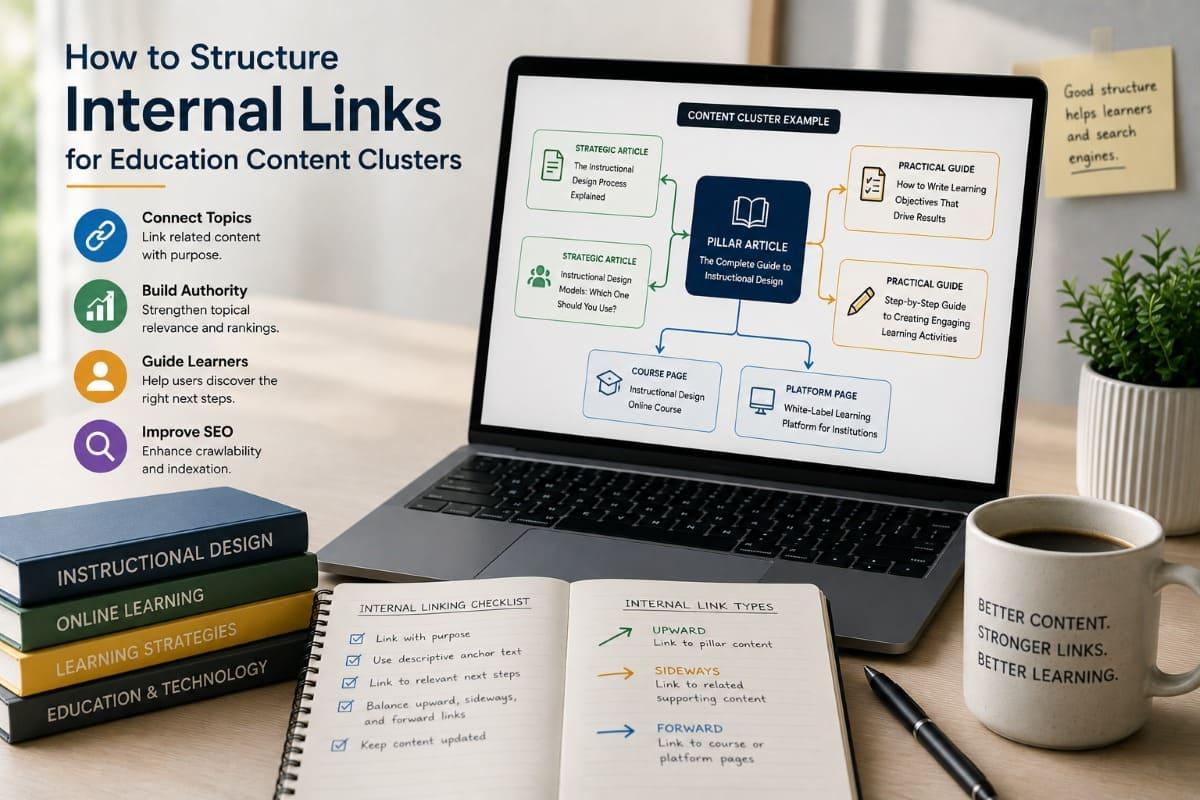
A practical education cluster should have three types of
link movement:
- upward
links to the main foundation article
- sideways
links to closely related sibling articles
- forward
links to course, platform, or next-step pages
This mirrors how learning pathways work. A learner may
revisit the foundation, explore adjacent concepts, or move toward application.

How to Link Pillar Articles, Supporting Articles, and Course Pages
A strong internal linking structure gives each page a clear
job.
The foundation article should introduce the broad topic and
link to the main supporting articles. Supporting articles should link back to
the foundation article and connect to closely related practical guides. Course
pages should link to articles that help learners understand the course value,
while articles should link to relevant course pages when the connection is
natural.
Link from the foundation article to supporting articles
The foundation article is usually the broadest page in the
cluster. It should not explain every subtopic in full detail. Instead, it
should introduce the topic and guide readers toward deeper resources.
For example, an article on education SEO can briefly explain
topical authority, then link to how
to build topical authority for an education brand.
This helps readers continue learning without making the
foundation article too long or unfocused.
Link from supporting articles back to the foundation article
Supporting articles should link back to the foundation page
when readers may need context. This is especially useful when a reader arrives
directly from search.
For example, someone landing on a course page SEO article
may need to understand the broader idea of education SEO first. A contextual
link back to the foundation article helps them orient themselves.
Link between sibling articles when the next step is logical
Sibling links should be selective. Not every related article
needs to be linked in every section.
A topical authority article may naturally link to a guide on
internal linking because internal links are part of how clusters become
coherent. A course page article may link to internal linking because course
pages need contextual links from articles and related pages.
Link from articles to course or platform pages when reader intent is ready
Not every paragraph should push a conversion link. The
conversion link should appear when the reader has enough context to understand
the relevance.
For example, after explaining how course pages connect to
learning delivery, it is natural to link to white-label
learning platform for education businesses.
FitAcademy
Connect Course Discovery With a Branded Learning Platform
FitAcademy helps education businesses and training providers connect content, course pages, mobile learning, progress tracking, and branded learner engagement inside a white-label learning platform.
Explore FitAcademy White LabelAnchor Text Should Explain the Learning Path
Anchor text is the visible text of a link. In an education
content cluster, anchor text should tell readers what they will find after
clicking.
Google’s link best practices recommend writing good anchor
text that is descriptive, concise, and relevant to the linked page. The same
guidance explains that anchor text helps both people and Google understand
linked content.
For education businesses, this has a clear editorial
implication: avoid vague anchor text when linking between learning resources.
|
Weak Anchor Text |
Better Anchor Text |
Why It Works Better |
|
Click here |
SEO for education businesses |
Describes the destination topic |
|
Read more |
how to build topical authority for an education brand |
Explains the next learning step |
|
This article |
course page optimization for education websites |
Clarifies relevance |
|
Learn more |
white-label learning platform for training providers |
Connects the link to platform intent |
|
Guide |
internal linking workflow for education content clusters |
Helps readers predict the content |
Good anchor text should be natural, not mechanically stuffed
with keywords. A sentence should still read well even with the link included.
For example:
Better:
Education teams that want stronger cluster depth should first understand how
to build topical authority for an education brand.
Weaker:
For topical authority education brand SEO topical authority education content,
click here.
The first version is useful. The second version is
over-optimized and awkward.
Anchor text should feel like a promise: clear enough that the reader knows what comes next.
Course Pages Need Internal Links in Both Directions
Course pages should not be isolated at the end of the
journey.
Many education websites publish course pages, then link to
them from menus or ads only. That leaves valuable editorial context unused. A
stronger strategy links from relevant articles to the course page and from the
course page back to useful supporting content.
This two-direction structure helps learners in different
stages.
A reader who starts with an article may be ready to evaluate
a related course. A reader who starts on a course page may need educational
content to understand whether the topic, level, or outcome fits their needs.
For example, a course page about SEO for education
businesses could link to:
- the
foundation article about education SEO
- a
guide to topical authority
- a
guide to course page optimization
- a
guide to internal linking
- a
platform page for branded learning delivery
This structure is useful because course decisions often
involve trust. Supporting articles can show how the provider thinks, teaches,
explains, and applies the topic.
A course page should not only receive links. It should also
send learners to supporting resources that reduce uncertainty and build trust.
This is especially important for higher-consideration
education offers. If a course is expensive, professional, institutional, or
linked to business outcomes, learners and decision-makers need more than a
short sales pitch.
For practical course page structure, connect readers to how
to create course pages that search engines and learners can understand.

How Internal Links Support White-Label Learning Platform Growth
Internal links can support white-label learning platform
growth by connecting public discovery content with owned learning experiences.
This matters because an education business may attract
learners through search, but the long-term value depends on what happens after
discovery. A reader may first find a blog article, then visit a course page,
then enter a branded platform where they learn, complete lessons, receive
certificates, or continue to another course.
Without internal links, that journey may be fragmented.
With internal links, the website can guide users from:
- educational
problem → related explanation
- explanation
→ practical guide
- practical
guide → course page
- course
page → branded learning platform
- platform
page → demo, contact, or enrollment path
For FitAcademy, this link structure supports a broader
business narrative. The brand is not only explaining education SEO. It is
showing how discovery, content organization, course delivery, mobile learning,
and platform ownership work together.
|
Website Asset |
Role in Learner Journey |
Internal Link Opportunity |
|
Blog article |
Builds understanding and trust |
Link to related guides and course pages |
|
Topic cluster hub |
Organizes related expertise |
Link to all major cluster pages |
|
Course page |
Explains the learning offer |
Link to supporting articles and enrollment path |
|
Platform page |
Explains delivery infrastructure |
Link from course strategy and learning operations articles |
|
Contact/demo page |
Converts serious prospects |
Link only when the reader has enough context |
A white-label platform page should not be forced into every
early article. It should appear when the article naturally discusses ownership,
learning delivery, branded experience, learner progress, analytics,
certification, or scalability.
This keeps the CTA relevant rather than intrusive.
Common Internal Linking Mistakes Education Teams Should Avoid
Internal linking mistakes often come from either neglect or
overcorrection. Some teams barely link at all. Others add too many links after
reading SEO advice.
Both approaches can create problems.
Mistake 1: Publishing orphan articles
An orphan article is a page with no meaningful internal
links pointing to it. Important pages should be linked from at least one other
page, especially if the business expects them to support SEO, learner
discovery, or conversion. Google’s link guidance explicitly notes that pages
you care about should have at least one link from another page on your site.
Mistake 2: Linking only from menus
Navigation menus are useful, but contextual links inside
article content often provide clearer meaning. A link placed in a relevant
paragraph can explain why the destination matters.
Mistake 3: Using the same exact anchor repeatedly
Repeating the same exact-match anchor everywhere can make
the writing feel mechanical. It is better to use natural variations that still
describe the destination clearly.
Mistake 4: Linking every page to every other page
This weakens the editorial purpose of links. Internal links
should indicate meaningful relationships, not merely create a dense web of
connections.
Mistake 5: Forgetting old articles after publishing new ones
When a new cluster article goes live, older articles should
be updated with relevant links. Otherwise, new content may not receive enough
internal support.
Mistake 6: Ignoring breadcrumbs and site hierarchy
Breadcrumbs help users understand where a page sits within a
website hierarchy. Google also provides BreadcrumbList structured data guidance
for eligible breadcrumb markup and recommends validating structured data with
tools such as the Rich Results Test.
Mistake 7: Treating internal links as only an SEO task
Internal links also support learning design. They help
readers understand sequence, prerequisites, and related concepts. For education
websites, this is not a small detail.
Practical Internal Linking Workflow for Education Content Teams
A practical internal linking workflow should be simple
enough to repeat every time a new article or course page is published.
Step 1: Define the page role
Before adding links, decide what role the page plays:
- foundation
article
- supporting
article
- practical
guide
- course
page
- platform
page
- category
page
- resource
page
- conversion
page
This role determines what types of links the page should
give and receive.
Step 2: Identify the reader’s next questions
Ask what the reader is likely to need next.
For example, a reader finishing an article about topical
authority may ask:
- How
do I organize related pages?
- How
do I link those pages?
- How
do I connect articles to courses?
- How
do I measure whether the cluster is working?
These questions suggest natural internal link targets.
Step 3: Add 3–6 contextual links where useful
There is no universal number that fits every page. A short
article may only need a few links. A long practical guide may need more. The
key is usefulness.
Place links where they help the reader continue, not where
they merely satisfy an SEO checklist.
Step 4: Link backward, sideways, and forward
A strong education cluster often uses three directions:
- Backward
link: to the foundation article
- Sideways
link: to a related guide
- Forward
link: to a course, platform, or next-step page
This creates a more complete learning pathway.
Step 5: Update older content after publishing
When a new article is published, review existing related
articles and add links to the new page where relevant. This helps avoid orphan
content and strengthens the cluster.
Step 6: Review links during content audits
Content audits should include internal links. Check whether
links are still relevant, whether destination pages still exist, whether anchor
text is clear, and whether important pages receive enough contextual links.
Step 7: Use breadcrumbs and category structure carefully
Breadcrumbs and categories should reflect real information
architecture. They should help users understand the website, not merely
decorate the page. If the category structure is messy, breadcrumbs may expose
that confusion rather than solve it.

FAQ
What is internal linking in education SEO?
Internal linking in education SEO means connecting related
pages on the same education website, such as blog articles, course pages, topic
hubs, and platform pages. It helps learners move through related content and
helps search engines understand how pages relate to one another.
How many internal links should an education article have?
There is no fixed number. A useful education article should
include enough internal links to guide the reader to relevant next steps
without cluttering the page. For many long-form articles, 3–6 contextual
internal links may be reasonable, but relevance matters more than quantity.
Should course pages link back to blog articles?
Yes, when the blog articles help learners understand the
course topic, context, or outcomes. Course pages should not only receive links
from articles; they can also link back to educational content that reduces
uncertainty and supports the learner’s decision.
What is the best anchor text for internal links?
The best anchor text is clear, concise, and descriptive. It
should tell readers what they will find after clicking. For example, “course
page SEO for education websites” is more useful than “click here” because it
explains the destination topic.
Are breadcrumbs important for education websites?
Breadcrumbs can help users understand where a page sits in
the website hierarchy, especially on larger education sites with categories,
courses, and resource hubs. Breadcrumb structured data may also help search
engines interpret page hierarchy when implemented correctly and validated.
Can internal links improve course enrollment?
Internal links can support enrollment indirectly by guiding
readers from educational content to relevant course pages or platform pages.
They do not guarantee enrollment, but they can reduce friction by helping
learners understand the topic, trust the provider, and find the next step more
easily.
Conclusion
Internal linking is one of the most practical ways to turn
education content into a structured learning journey.
For education businesses, the value is not only technical
SEO. Internal links help readers move from basic understanding to deeper
strategy, from article to course page, and from course page to branded learning
experience. They also help content teams build topical authority with more
discipline.
A strong internal linking structure begins with a clear
cluster map. It uses descriptive anchor text, connects pillar and supporting
articles, links course pages in both directions, and updates older content when
new pages are published. It avoids both extremes: isolated pages with no links
and over-linked pages that feel mechanical.
For training providers, edtech marketers, and education
brands, the larger lesson is straightforward: discovery should not stop at the
first click. A well-linked content cluster helps learners continue, compare,
decide, and eventually enter a learning experience that feels coherent.
That is where internal linking connects naturally with
platform strategy. When public content, course pages, and a white-label
learning platform support one another, the education brand becomes easier to
find, easier to understand, and easier to trust.
FitAcademy
Build a Learning Journey Beyond the First Click
FitAcademy helps education businesses and training providers connect content discovery, course pages, mobile learning, progress tracking, and branded learner experiences through a white-label learning platform.
Explore FitAcademy White Label