A modern learning platform is no longer simply a place to
upload videos, documents, and quizzes. In 2026, institutions, training
providers, creators, and corporate learning teams need infrastructure that can
deliver learning across devices, organize complex learner journeys, generate
useful operational data, and integrate with a wider digital ecosystem.
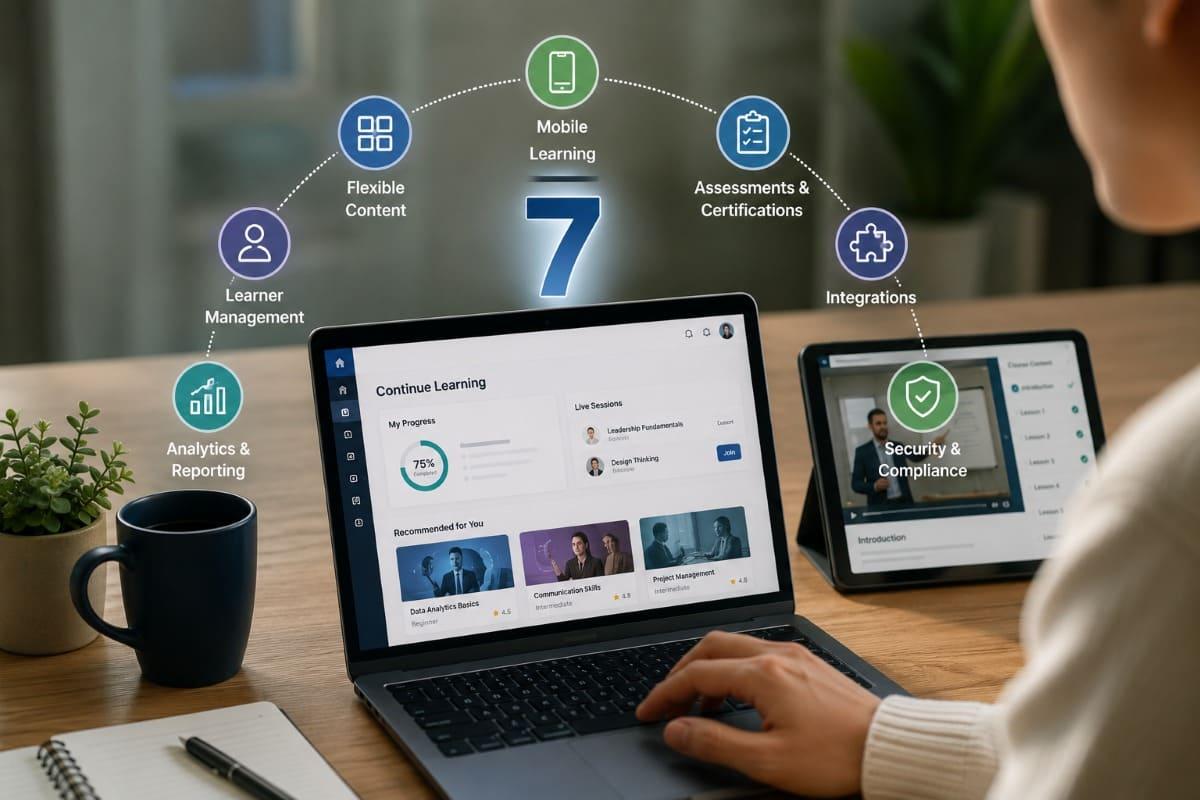
This article examines seven capabilities that should form
the foundation of a modern learning platform: mobile-first delivery, modular
content management, structured learner administration, assessment and
credentialing, actionable analytics, interoperability, and trust-by-design. It
also explains how decision-makers can evaluate these features without being
distracted by long product checklists or fashionable technologies that do not
solve their actual learning-delivery problems.
- Quick
Answer
- Why
the Definition of a Modern Learning Platform Has Changed
- The
Seven Essential Features of a Modern Learning Platform
- How
the Seven Features Work Together
- A
Practical Framework for Evaluating Learning Platforms
- Common
Platform Selection Mistakes
- FAQ
- Conclusion
Quick Answer
Every modern learning platform in 2026 should provide seven
core capabilities:
- Mobile-first
and low-bandwidth learning delivery
- Modular
content creation with responsible AI support
- Flexible
user, cohort, role, and learning-path management
- Integrated
assessments, progress tracking, and credentials
- Actionable
learning analytics and reporting
- Interoperability
through APIs and recognized standards
- Accessibility,
privacy, security, localization, and brand control
These features matter because digital learning now serves a
much wider range of learners, devices, organizational structures, and business
models. A platform may need to support employees completing mandatory training,
students following structured courses, community members consuming short
lessons, or paying customers purchasing professional education.
The important trade-off is that more features do not
automatically create a better platform. Each capability must support a defined
operational requirement. Organizations should therefore evaluate not only
whether a feature exists, but also how it works, who can manage it, what data
it produces, and whether it remains practical as learner volume and content
complexity grow.
Why the Definition of a Modern Learning Platform Has Changed
Earlier generations of online learning systems were
primarily designed to reproduce classroom administration digitally. Their main
functions were usually course enrollment, content storage, assignment
submission, testing, and completion records.
Those capabilities remain useful, but the operating
environment has become more demanding.
Organizations now deliver learning to distributed audiences
across different countries, connectivity conditions, languages, devices, and
employment arrangements. A learner may begin a lesson on a laptop, continue it
on a smartphone, receive a reminder through a mobile application, and apply the
knowledge outside the platform.
Global connectivity has expanded, but access remains uneven.
The International Telecommunication Union estimated that approximately six
billion people were online in 2025, while 2.2 billion remained offline. It also
reported major differences in connection quality, affordability, location, and
digital skills. These conditions make lightweight delivery, mobile usability,
and realistic bandwidth requirements essential rather than optional. ITU
Facts and Figures 2025
At the same time, learning operations have become more
complex. Education providers may need to manage free and paid programs,
internal and external learners, multiple instructors, professional
certificates, cohort schedules, mobile applications, analytics dashboards, and
integrations with other organizational systems.
A modern platform must therefore function as learning
infrastructure, not merely as a digital content library.
A platform should be evaluated by the learning operation it
can support, not by the number of features displayed on its product page.

The Seven Essential Features of a Modern Learning Platform
1. Mobile-First and Low-Bandwidth Learning Delivery
Mobile compatibility is not the same as mobile-first design.
A compatible platform may technically open on a smartphone
but still require extensive scrolling, small-button navigation, large file
downloads, or desktop-oriented workflows. A mobile-first platform is designed
around the way people actually use smaller screens: shorter sessions, touch
interactions, interruptions, variable connectivity, and movement between
devices.
At a minimum, organizations should look for:
- Responsive
interfaces that remain usable on smaller screens
- Video
quality that can adapt to different connection speeds
- Content
formats that do not depend on large downloads
- Progress
synchronization between web and mobile environments
- Clear
navigation that requires minimal interaction
- Captions,
transcripts, and downloadable supporting materials
- Optional
reminders or notifications
- Offline
or limited-connectivity access where the audience requires it
A dedicated mobile application may be valuable, but it is
not automatically necessary for every program. A browser-based mobile
experience may be sufficient for short courses, early-stage programs, or
audiences that do not want to install another application.
A native or dedicated application becomes more relevant when
learning is frequent, notifications are important, offline access is required,
or the organization wants a stronger branded presence on learners’ devices.
The right question is therefore not, “Does the platform have
an app?” It is, “What learner behavior does the mobile experience support?”
Organizations planning institutional mobile delivery can
explore how
educational institutions can deliver mobile-first learning experiences. For
broader context, see why
mobile learning matters in global education.
Mobile-first learning is not a smaller desktop experience. It is a learning journey designed around different behavior.
2. Modular Content Creation With Responsible AI Support
Modern learning platforms should allow content teams to
create, organize, update, reuse, and distribute learning materials without
rebuilding entire courses whenever one lesson changes.
This requires a modular content structure.
Instead of treating a course as one large, fixed package,
the platform should allow teams to manage smaller components such as:
- Short
videos
- Text-based
explanations
- Audio
lessons
- Images
and diagrams
- Quizzes
- Reflection
questions
- Assignments
- Downloadable
resources
- Practical
activities
- Assessments
and certificates
Modular content is particularly important for microlearning.
Shorter lessons can be combined into programs, learning paths, onboarding
sequences, refresher training, or role-specific collections. When a policy,
product, or procedure changes, the organization can update the relevant
component without recreating the entire program.
Artificial intelligence is increasingly being introduced
into content workflows. Useful applications may include outlining lessons,
generating draft questions, proposing summaries, translating source material,
producing captions, or adapting content for different reading levels.
However, AI functionality should support editorial work
rather than bypass it. Learning teams still need to verify factual accuracy,
instructional relevance, intellectual-property rights, bias, assessment
quality, and alignment with learning objectives.
The NIST AI Risk Management Framework provides a useful
general reference for organizations developing governance around trustworthy AI
use. NIST AI
Risk Management Framework
Before selecting AI-assisted authoring features,
decision-makers should verify:
- Whether
AI use is optional
- Which
data is processed
- Whether
organizational content is used to train external models
- Whether
generated material can be reviewed before publication
- Whether
sources and revisions can be documented
- Whether
different user roles can control AI access

3. Flexible User, Cohort, Role, and Learning-Path Management
A platform may deliver excellent content but still become
difficult to operate when learner administration is weak.
Modern platforms should support more than individual user
registration. Organizations often need to manage learners according to
departments, institutions, membership levels, customer accounts, geographic
regions, certification programs, or scheduled cohorts.
Useful administration capabilities include:
- Individual
and bulk user enrollment
- Cohorts,
groups, classes, or organizational units
- Different
roles for administrators, instructors, reviewers, and learners
- Public,
private, free, paid, and invitation-only access
- Prerequisites
and sequential learning paths
- Enrollment
periods and completion deadlines
- Automated
access based on payment or membership status
- User
import and export
- Single
sign-on where required
- Clear
permissions for content and data access
Role-based access is especially important. An instructor may
need to review learner progress without seeing financial information. A
regional administrator may need to manage one learner group without accessing
the entire organization. A content reviewer may need editing access but no
authority to publish.
Weak permission structures frequently lead to manual
workarounds, duplicated accounts, spreadsheet-based administration, and
avoidable data exposure.
Structured learning paths are equally important. Learners
should not always be presented with an undifferentiated catalogue. The platform
should be able to guide them through the right content based on their role,
starting point, previous completion, selected program, or organizational
requirement.
Personalization does not need to rely on complex artificial
intelligence. In many cases, carefully designed rules, pathways, categories,
and prerequisites are more transparent and easier to manage.
Effective personalization often begins with better program
structure, not more complicated algorithms.
4. Integrated Assessments, Progress Tracking, and Credentials
Content consumption alone does not demonstrate learning.
A modern platform should help organizations measure whether
learners have understood, practiced, completed, or demonstrated the intended
capability. The appropriate evidence will depend on the program.
A short awareness course may only require a knowledge check.
A professional program may require assignments, instructor review, project
submission, attendance, supervised assessment, or practical demonstration.
Core capabilities may include:
- Multiple
assessment formats
- Question
banks and randomized questions
- Pass
scores and retake rules
- Assignment
submission
- Instructor
feedback
- Completion
criteria
- Course
prerequisites
- Certificates
- Digital
badges
- Expiration
and renewal dates
- Records
of attendance, progress, and achievement
The platform should also distinguish activity from
achievement. Watching every video does not necessarily mean that a learner can
apply the material. Completion percentages are useful operational signals, but
they should not be treated as proof of competency unless the learning design
supports that conclusion.
Credentials also need appropriate governance. Before issuing
certificates or badges, organizations should define what the credential
represents, who authorizes it, how it can be verified, whether it expires, and
what learners must do to earn it.
Engagement features such as points, leaderboards, streaks,
or badges can support participation in some contexts, but they should remain
secondary to the learning objective. Gamification that rewards repetitive
clicking or rapid completion may produce activity without meaningful learning.
FitAcademy
Understand the Infrastructure Behind Modern Learning Delivery
FitAcademy provides web and mobile microlearning infrastructure for organizations, institutions, training providers, and creators that need a more structured way to manage content, users, progress, and learning delivery.
Learn More About FitAcademy5. Actionable Learning Analytics and Reporting
Analytics should help people make decisions.
Many platforms display enrollment numbers, total logins,
video views, or average completion rates. These metrics can be useful, but they
become operationally valuable only when teams know what decision each metric
should inform.
A modern analytics environment should help answer questions
such as:
- Where
do learners stop progressing?
- Which
lessons are frequently repeated?
- Which
assessment questions produce unexpected failure patterns?
- Which
cohorts require additional support?
- How
long does completion typically take?
- Are
reminders improving return rates?
- Which
programs are being used but not completed?
- Are
learners achieving the intended assessment standard?
- Which
content should be revised, retired, or expanded?
- Are
different learner groups experiencing different outcomes?
Reports should also be appropriate for different
stakeholders. Instructors may need individual learner progress. Program
managers may need cohort comparisons. Executives may need participation,
completion, cost, compliance, or revenue summaries. Content teams may need
lesson-level engagement and assessment data.
Data must also remain interpretable. A sophisticated
dashboard is not useful if administrators cannot understand how metrics are
calculated or export the underlying information for further analysis.
Before procurement, organizations should ask vendors to
demonstrate actual reporting workflows using realistic scenarios. Screenshots
of attractive dashboards are not enough.
They should also verify data retention, export formats,
ownership, role-based visibility, and the consequences of ending the platform
contract.

6. Interoperability, APIs, and Integration Capability
Learning platforms rarely operate alone.
An institution may already use a student information system,
human resources platform, customer relationship management system, payment
gateway, identity provider, video-conferencing service, content authoring tool,
or business-intelligence platform.
Without integration capability, staff may need to move user
data, completion records, payment information, and course results manually.
This increases administrative work and creates opportunities for inconsistent
or outdated records.
A modern platform should therefore provide some combination
of:
- Documented
APIs
- Webhooks
- Single
sign-on
- User
provisioning
- Data
import and export
- Payment
integrations
- Communication
integrations
- Analytics
connections
- Standardized
content or learning-tool integration
- Reliable
integration documentation and support
Recognized standards can reduce dependence on one-to-one
custom integrations.
For example, 1EdTech’s Learning Tools Interoperability
standard is designed to connect external learning tools with institutional
learning environments through a standardized and secure approach. 1EdTech Learning Tools
Interoperability
OneRoster supports the exchange of data such as users,
courses, enrollments, and grades, particularly in school-system contexts. 1EdTech OneRoster standard
Not every organization needs every standard. A small creator
business may be more concerned with payment, email, and customer-management
integrations. A university may prioritize identity management, student records,
and external academic tools. A corporate learning team may need HR-system
synchronization and automated assignment based on employee roles.
The objective is not maximum integration. It is avoiding a
platform architecture that becomes isolated from the systems the organization
already depends on.
7. Accessibility, Privacy, Security, Localization, and Brand Control
Trust-related capabilities are sometimes treated as separate
procurement categories. In practice, they determine whether a platform can be
used responsibly across a broad audience.
Accessibility should be considered during platform
selection, interface design, content creation, and quality assurance. The Web
Content Accessibility Guidelines provide internationally recognized
recommendations for making digital content more accessible to people with
visual, auditory, physical, speech, cognitive, language, learning, and
neurological disabilities.
W3C recommends using WCAG 2.2 when developing or updating
accessibility policies. Its guidance applies across desktops, laptops, kiosks,
and mobile devices. Web Content
Accessibility Guidelines 2.2
Practical accessibility features include:
- Keyboard
navigation
- Sufficient
visual contrast
- Alternative
text for meaningful images
- Captions
and transcripts
- Screen-reader
compatibility
- Visible
focus indicators
- Accessible
authentication
- Appropriate
touch-target sizes
- Clear
error messages
- Content
that does not depend only on color, sound, or motion
Privacy and security require more than a privacy-policy
page. Organizations should evaluate how the platform handles authentication,
permissions, encryption, backups, incident response, data retention,
third-party processors, account deletion, and regulatory requirements in the
markets where learners are located.
Localization is also broader than translation. A global
learning experience may need local languages, date formats, currencies, time
zones, examples, reading directions, cultural context, and region-specific
support.
Brand control matters because the platform becomes part of
the learning relationship. Useful controls may include the domain, visual
identity, navigation, email sender details, mobile application presence, course
presentation, certificates, learner communications, and support information.
However, branding should not be reduced to changing a logo
and color palette. The deeper issue is whether the organization can create a
consistent experience and maintain appropriate control over its audience,
content, data, and operating model.
This strategic distinction is explored further in why
branded learning experiences increase trust and engagement.
The trust layer of a learning platform is built through accessibility, governance, consistency, and control—not visual branding alone.

How the Seven Features Work Together
The seven capabilities should not be evaluated as isolated
product modules.
Mobile delivery affects content design. Content structure
affects analytics. User roles affect data security. Assessments affect
credentials. Integrations affect administrative workload. Accessibility affects
both the interface and every lesson uploaded to it.
A platform becomes operationally mature when these elements
reinforce one another.
|
Capability |
Weak Implementation |
Stronger Implementation |
|
Mobile delivery |
Desktop pages reduced to fit a phone |
Learning flows designed for touch, short sessions,
variable bandwidth, and cross-device continuity |
|
Content management |
Large courses that are difficult to update |
Reusable modules that can be revised, combined, and
distributed efficiently |
|
Learner administration |
Manual enrollment and broad administrator access |
Cohorts, roles, permissions, pathways, and automated
access rules |
|
Assessment |
One generic quiz at the end of a course |
Assessment methods aligned with learning objectives and
credential requirements |
|
Analytics |
Counts of logins, views, and enrollments |
Reports connected to program, content, learner-support,
and business decisions |
|
Integrations |
Manual CSV transfers and disconnected tools |
APIs, standards, identity connections, and automated data
flows |
|
Trust and control |
Logo customization and a generic privacy notice |
Accessibility, privacy, security, localization, data
governance, and consistent brand ownership |
Organizations should therefore test complete workflows
rather than reviewing features individually.
For example, a realistic platform demonstration might begin
with importing a learner group, assigning a mobile-friendly program, completing
several lessons, failing and retaking an assessment, issuing a certificate,
reviewing the results, exporting the records, and removing access for one user.
That workflow will reveal much more than a feature
checklist.
A Practical Framework for Evaluating Learning Platforms
Start With the Learning Operation
Before comparing products, define what the organization is
trying to operate.
Document:
- Primary
learner groups
- Expected
learner volume
- Types
of programs
- Content
formats
- Assessment
requirements
- Instructor
involvement
- Payment
or membership models
- Reporting
responsibilities
- Required
languages
- Mobile
and connectivity conditions
- Integration
requirements
- Data-governance
obligations
This prevents attractive but irrelevant features from
dominating the selection process.
Separate Essential Requirements From Future Possibilities
Create three requirement categories:
Essential at launch: The platform cannot support the
program without these capabilities.
Important within the next phase: These are likely to
become necessary as adoption grows.
Potentially useful: These may add value but should
not determine the initial decision.
This distinction is particularly important for early-stage
learning businesses and smaller organizations. Purchasing infrastructure for a
hypothetical future can create unnecessary cost and complexity. Selecting a
platform with no expansion path creates the opposite problem.
Test Real Administrative Workflows
Invite the people who will operate the platform to
participate in evaluation.
A senior decision-maker may focus on strategic capabilities,
but administrators, instructors, content producers, finance teams, support
staff, and data specialists often discover practical limitations.
Test how long it takes to:
- Publish
and revise a lesson
- Enroll
500 learners
- Change
access for one cohort
- Review
incomplete learners
- Export
assessment results
- Replace
a certificate design
- Correct
an enrollment error
- Assign
different permissions
- Respond
to a learner-support issue
Pilot With Representative Learners
A pilot should include users with different devices,
connection speeds, digital confidence levels, roles, and accessibility needs.
Testing only with internal staff on fast office connections
can hide important usability problems. A technically successful pilot may still
fail to represent the actual learner environment.
Institutions developing a mobile-first pilot can use the
implementation considerations in mobile-first
learning delivery for educational institutions.
Evaluate Ownership and Exit Conditions
Platform selection should also consider what happens when
the organization grows, changes providers, restructures a program, or ends the
service.
Verify whether the organization can export:
- User
profiles
- Enrollment
records
- Completion
data
- Assessment
results
- Certificates
or credentials
- Learning
content
- Financial
records
- Analytics
history
Also determine the export format, process, cost, and level
of technical assistance required.
The true portability of a learning platform becomes visible
when an organization asks how its content, learner records, and operational
data can leave.
Common Platform Selection Mistakes
Choosing the Platform With the Longest Feature List
Feature quantity is easy to compare but often misleading.
Two platforms may both claim to offer analytics, mobile
learning, certificates, and integrations while providing very different levels
of control and usability. One may offer only summary reports, while another
provides cohort filtering, exports, scheduled reporting, and role-based
visibility.
Decision-makers should define the required workflow behind
each feature instead of marking simple yes-or-no boxes.
Treating Mobile Learning as a Responsive-Design Project
A page can be technically responsive while remaining
difficult to learn from.
Long videos, dense PDFs, complex menus, tiny controls, and
high data consumption can make a mobile-compatible course operationally
inaccessible. Mobile evaluation should include lesson length, navigation, media
weight, notification strategy, assessment design, and continuity between
devices.
Collecting More Data Without Defining Decisions
Platforms can generate large volumes of activity data, but
collecting information has operational and privacy costs.
Before activating advanced tracking, teams should identify
who will use the data, what decisions it will support, how frequently it will
be reviewed, and how long it should be retained.
More data is not automatically better data.
Assuming AI Automatically Improves Learning Quality
AI can accelerate drafting and administration, but it can
also generate inaccurate explanations, weak distractors, repetitive lessons,
inappropriate translations, or materials that do not reflect the organization’s
context.
The better approach is a controlled workflow in which AI
assists production while qualified people remain responsible for objectives,
accuracy, pedagogy, approval, and publication.
Underestimating Content and Platform Operations
A successful implementation requires more than software
configuration.
Organizations need decisions about course ownership,
publishing approval, content review cycles, learner support, instructor
responsibilities, assessment governance, data access, certificate
authorization, and reporting schedules.
A powerful platform cannot compensate indefinitely for
undefined operations.
FAQ
What is the most important feature in a modern learning platform?
There is no universally most important feature. Priority
depends on the learning model. A global workforce program may prioritize mobile
access, reporting, and identity integration. A creator business may prioritize
content publishing, payment, branding, and learner communication. The best
starting point is the feature that removes the largest operational barrier
while supporting the organization’s core learning objective.
Does every learning platform need a dedicated mobile application?
No. A well-designed mobile web experience may be sufficient
for occasional learning, short programs, or early-stage delivery. A dedicated
application becomes more valuable when learners return frequently, require
offline access, depend on notifications, or expect a stronger branded
experience. Organizations should evaluate learner behavior before treating an
application as a mandatory requirement.
How much AI functionality should a learning platform provide in 2026?
AI should support clear workflows rather than exist as a
decorative feature. Useful capabilities may include content outlining,
captions, translation assistance, question drafting, search, and administrative
support. Organizations should still require human review, data controls,
transparent permissions, and the ability to disable inappropriate uses. AI
capability should never replace evaluation of the platform’s core learning
infrastructure.
What is the difference between an LMS and a modern learning platform?
An LMS traditionally focuses on administering courses,
enrollment, assignments, testing, and completion. A modern learning platform
may include those functions while extending into mobile delivery, modular
microlearning, content commerce, integrations, branded experiences, richer
analytics, and multiple audience models. The terminology is not standardized,
so buyers should evaluate actual capabilities rather than relying on the
product category.
How should an organization evaluate platform security and privacy?
Request documented information about authentication,
permissions, encryption, backups, data location, subprocessors, retention,
deletion, incident response, and administrative access. The organization should
also review its own responsibilities, including password policies, staff
permissions, consent, lawful data use, and account offboarding. Security is a
shared operational process, not a vendor feature that can be switched on once.
Can one learning platform support both internal and external audiences?
It can, provided the platform supports appropriate
separation between groups, permissions, content, reporting, branding, payment,
and communication. The organization should test whether administrators can
manage each audience without exposing unrelated data or creating excessive
manual work. In some cases, separate portals or branded environments may
provide clearer governance than one shared catalogue.
Conclusion
The defining characteristic of a modern learning platform is
not novelty. It is the ability to support reliable learning operations across
different audiences, devices, programs, and stages of organizational growth.
Mobile-first delivery expands practical access. Modular
content makes programs easier to maintain. Structured user management reduces
administrative friction. Assessment and credentialing connect activity with
achievement. Analytics support better decisions. Integrations prevent the
platform from becoming isolated. Accessibility, privacy, security,
localization, and brand control create the trust required for long-term use.
Organizations do not need to purchase every advanced
capability immediately. They do need to understand which capabilities are
essential to their present model, which limitations may block future growth,
and which responsibilities will remain with their own teams.
The strongest platform decision is therefore not based on
which product appears most sophisticated. It is based on which infrastructure
best matches the organization’s learners, operating model, governance
requirements, and long-term learning strategy.
FitAcademy
Build a More Structured Learning Experience
FitAcademy supports organizations, training providers, institutions, and creators with web and mobile microlearning infrastructure designed for structured content delivery, learner management, progress tracking, and scalable learning operations.
Learn More About FitAcademy